

The Hidden iPhone Feature That Could Be A Lifesaver On A Trip Abroad

Visiting a foreign country can be a thrilling and intimidating experience. One of the biggest challenges for many travelers is navigating through the language barrier. If you have an Apple iPhone with iOS 14 or newer, your device has a preinstalled app, Translate, that can be a lifesaver when abroad. Translate works between 21 languages, including American and British English, other widely spoken European languages, and several Asian languages to make interlingual communication easier. It also works offline, as long as you have the language packs downloaded.
Translate can instantly translate words, sentences, or conversations, written or spoken, in the app and also has several hidden features that work across your iPhone. In Messages, users can highlight a word or a phrase from a conversation in a foreign language, then select "translate" to see the phrase in another language. If you are chatting with someone in a foreign language and have a newer version of the iPhone (iPhone 15 and later), turn on Apple Intelligence in settings, then head back to the conversation, tap the person's name, and select "automatically translate" to your language of choice.
You can also integrate real-time audio translation with Apple's newest AirPods and the AirPods Pro 2 (or later models) during a call. This can be useful for travelers who are trying to schedule an airport pick-up or call a restaurant to make reservations, for example. App Store reviewers have praised the app's AirPods integration for Spanish, Chinese, and other languages. Similarly, Redditor u/willrb wrote that he and a native Brazilian Portuguese speaker were "pretty blown away" with the app's IRL translation features on the r/Apple board. Be aware, though, that you may have to deal with audio bugs and mistranslations.
Translate's under-the-radar browser and camera integration features
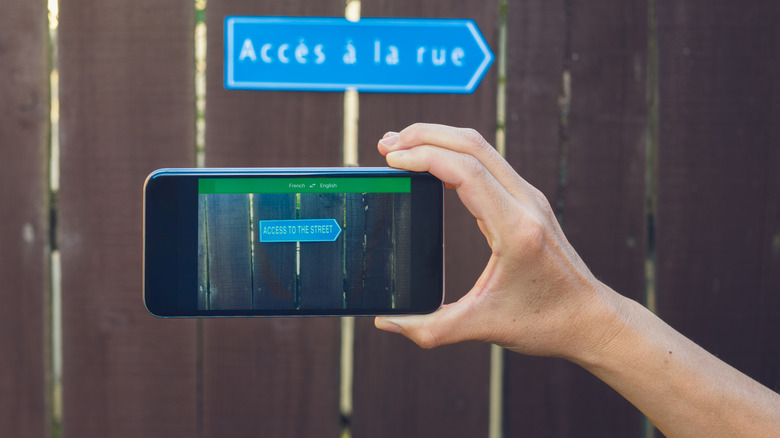
While travelers can use Translate to communicate, they can also use it to better understand their surroundings in a foreign country by using two other popular iPhone apps, Safari and the Camera app. When using Safari, tapping the menu on the left side of the search bar gives you the option to translate a website from a foreign language to English. These translations can come in handy whether you are navigating a Wi-Fi login page, renting a scooter in Bali, or diving into a Korean food blog before dinner.
The Camera app's built-in translation feature can be a lifesaver for travelers trying to figure out a bus schedule in Chinese characters, following travel guru Rick Steves' advice for eating like a local in Europe, or navigating a convenience store in Asia. If you find yourself lost in translation, snap a picture of the object or sign, then view the photo. Touch the small icon in the bottom right corner of the screen and you'll see an option to translate the text into another language. When writing this article, we used it to translate instructions about how to prepare coffee in Bahasa Indonesia, as well as the nutrition information on a bag of Korean shrimp chips. Both translations were clear and accurate. Of course, you can also open the Translate app and use the app's camera feature to translate foreign words and signs in real time.
Caveats to know when using the app
If you're in a pinch on a trip and need to look up a word (or how to say it), Translate can really come through and save the day. Like Google Translate, Apple's app displays the approximate pronunciation of several languages, including Korean, Japanese, and Mandarin, beneath the word in the English alphabet. There is also a play button to hear how the word is spoken. If you'd like to know more about the word, the app's built-in dictionary function displays a word's definition, part of speech, stress markers, and other example sentences.
Travelers depending on the app should be aware that some conversation and translation features may be a bit unnatural. While writing this article, we spoke and wrote the sentences "I have a peanut allergy. Does this food have peanuts in it?" in Russian, Indonesian, and Spanish in Translate. Compared to the same Google Translate feature, the app provided slightly awkward translations. Translate largely understood what was written and said, but it used too few or incorrect punctuation marks in Indonesian and Russian, and produced more literal translations directly from English. It's important to be aware of these potential issues when using iPhone's features abroad. And that's why, despite technology's advances, learning basic phrases in a foreign language can be extremely useful to help get you out of a jam or enrich your travel experience even more.